Video annotation enables computer vision models to understand how objects move, interact, and change over time. By labeling and tracking objects across frames, high quality video annotation provides the temporal context required for accurate prediction, behavior analysis, and decision making in safety critical and real world AI applications.
![Video Annotation for Computer Vision [A Practical Guide, Techniques & Best Practices]](https://cdn.prod.website-files.com/65855f99c571eeb322e2b933/6941d8f2ad1954bf2c9f8866_video-annotation-guide-hero.webp)

Computer vision applications have experienced massive growth across industries since 2025. The proliferation of computer vision products, however, has done little to make the development of computer vision any easier. The use cases for AI models have expanded to include video analysis. This means the accompanying challenges have also expanded.
Here’s the biggest obstacle: computer vision relies on annotated data, and as the saying goes, “garbage in, garbage out.”
There’s no such thing as high-performing AI video analysis without high-quality training data. What’s more, video annotation for computer vision can be more time-consuming than annotation for still images. That’s because video annotation is often used in safety-critical applications, so accuracy and consistency are critical.
Video annotation is important because it allows machine learning models to understand sequences of events, better known as temporal understanding. In addition, it’s a vital tool for helping AI models learn how people and equipment move around and occupy space.
This guide will help you understand key techniques, workflows, quality standards, and industry applications to ensure your computer vision project succeeds.

Video annotation is an evolution of image annotation.
If image annotation involves labeling objects in an image, then video annotation involves tracking those objects across time as they appear, take new actions, and display new features across frames. Video annotation enables these models to “understand” that images taken a fraction of a second apart may contain the same targets performing the same actions.
For example, let’s say that you’re training a computer vision application to provide commentary on baseball pitches. Your annotators would label thousands of short videos depicting the target. They might use masking to highlight baseball pitchers in action, keypoint annotation to show the players’ joint positions, and bounding box annotation to describe the ball's position.
Annotators would repeat those actions across a variety of different scenarios:
At the end of the training, the AI model would be able to recognize a baseball pitch from nearly any angle. It would be able to break down different actions during the pitch. Maybe it would even be able to predict the kind of pitch that a selected player is about to deliver and how fast it will go.
To achieve this success, however, you’d need some very detail-oriented annotators.
You’d need experts in the craft of video annotation, plus experts in the science of baseball, to create a labeling guide. And you’d need to know all of the best practices to monitor output quality and keep your annotators on track.
The key difference between video annotation and image annotation is time. Understanding video annotation vs image annotation is essential for choosing the right training data strategy. Video provides temporal context, allowing AI models to understand how objects move and events unfold in sequence. As a result, video can provide better training data than still images.
Video Annotation vs Image Annotation Overview
Returning to our baseball pitcher analogy, we can see a few ways in which video annotation provides more helpful data than image annotation.
By contrast, let’s say that a bird flies between a camera and the subject during video data annotation. The labeler can show the subject as they appear both before and after an occlusion, giving the model a better chance of responding correctly.
Lately, video annotation can be more efficient than image annotation through the use of interpolation and keyframes.
Depending on the frame rate, a video can consist of dozens of still images where there are minimal apparent changes in an object’s motion. Annotators can streamline their workload by marking only the keyframes, which represent meaningful points of change. The model can then generate the movement between those points through interpolation.
In general, video annotation is the better choice when motion, behavior, or temporal patterns matter—such as in autonomous driving, sports analytics, or safety monitoring. Image annotation still plays a critical role when you're working with static scenes, high-resolution stills, or specialized images like medical scans. Many AI teams use both, selecting the method that aligns with the complexity and requirements of their computer vision application.
There are four key video annotation techniques: bounding boxes and 3D cuboids; polygons and polylines; keypoints; and semantic segmentation. Let’s explain in more detail.
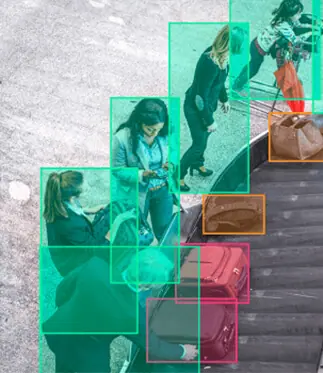
Bounding boxes are what they sound like: simple boxes representing the boundaries of objects in motion. These are best used for simple objects and recognizable shapes, and in applications where precision isn’t a huge concern. If your phone camera automatically detects objects like faces in its viewfinder, then you may have already seen bounding boxes in the wild.
3D cuboids are an evolution of video box annotation. These add depth and volume information to an image. More simply, they help AI models understand how close or distant an object is from a camera, or how much space it takes up.
If you wanted to count how many pedestrians are crossing a street, how many vehicles are on a highway, or how many widgets are on an assembly line, bounding boxes would be a great choice. If you wanted a robot to pick up and manipulate a widget, or a driverless car to avoid a pedestrian precisely, then you might need a more precise annotation approach.
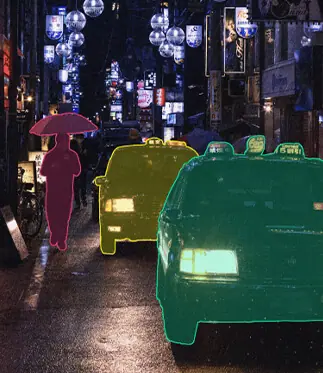
What if you’re annotating a more complex and irregular shape, or need more precision in a safety-critical application? Polygons are multi-point shapes that conform to irregular object boundaries. This method, often referred to as polygon annotation, allows annotators to capture precise object contours that bounding boxes can’t represent. Think of something like a human hand, a bird in flight, or a bicycle. These are irregular shapes that change shape from different viewing angles, which makes them harder to track with bounding boxes.
In similar applications, you may have very regular borders that still need to be defined with absolute precision. Polylines are great for annotating linear features that won’t fit into bounding boxes but are nonetheless important. This type of labeling, known as polyline annotation, is essential for accurately marking lane boundaries, road edges, and other elongated structures in video data. Think of lane markings, sidewalks, bike trails, and town boundaries.
You don’t always need polygons and polylines, but they are crucial when accuracy is required. You might use a bounding box to count widgets on an assembly line, but you’d use polygons to identify human organs before robot-assisted surgery. And you’d use polylines to help autonomous vehicles stay in the correct lane.

For keypoint and skeleton annotation, let’s say you want to build a machine learning model to monitor industrial robots. You could use keypoints to annotate each functional joint of the machine. By connecting those keypoints, you’d create a skeletal structure. This is useful for a kind of analysis called pose estimation.
This kind of annotation is useful outside because it can be used to recognize and predict all kinds of activity. Pose estimation could tell you that a machine’s range of motion is compromised, for example. That could mean it’s due for maintenance. Alternatively, it could be used to enable gestural controls for phones, game consoles, and other human-machine interfaces.
Semantic segmentation is a data annotation method that uses pixel-level labeling to classify every element in a frame. This is used for videos in which it is critical to:
In a picture of a room full of people, semantic segmentation could highlight every person and create separate masks for objects such as furniture and appliances. This kind of resource-intensive data annotation helps computer vision models understand very detailed scenes and build a picture of the environment.
Semantic segmentation is suited for applications requiring a vast level of detail. Imagine using a video of a farm to count the number of crops versus the number of weeds. Other applications include autonomous driving, medical imaging, surgical robotics, infrastructure monitoring, and more.

Let’s dive deeper into video annotation use cases. Computer vision applications have been multiplying over the last few years. Therefore, even industries that barely looked into computer vision a few years ago are now finding ways to incorporate this technology.
This list barely scratches the surface of potential applications, but it provides a few valuable starting points for companies looking to implement their own computer vision projects. But knowing that computer vision would be useful isn’t the same thing as implementing it. What is the best way to start adapting computer vision for your use case?
When it comes to the video annotation workflow, speed kills. Building a computer vision application that’s responsive in practice can require months or even years of annotation beforehand. Because video annotation is so often used for safety-critical applications, there are no substitutes for a detailed and disciplined approach. Here are some best practices to follow:
What are you setting out to achieve? Your computer vision project needs clearly defined objectives and outcomes, supported by annotation quality standards. A comprehensive design document will save you from troubleshooting and rework down the line.
Are you currently asking how to annotate videos for your use case? You may not be able to train yourself or your AI team within the timeframe of your project. It’s best to work with a trusted partner or platform that offers data annotation services and support.
Even a short video can contain tens of thousands of frames. Annotating all of those frames would be tedious and likely unnecessary. A process known as frame sampling lets you select a smaller number of frames, such as one in every ten, to provide a more manageable workload without compromising accuracy.
not all of the footage will be useful for training. You’ll want to select only the frames where someone is actively pitching a baseball. This process, known as frame sampling, helps you narrow down the amount of video you need to annotate.
With techniques like interpolation, it’s usually unnecessary to annotate every frame of a video. If you skip too many frames, however, you’ll lose accuracy, and predictions will suffer. Work with video experts to identify keyframes in your training data.
Annotator agreement is one of the most important metrics in video annotation and one of the best ways to enforce quality standards. If two annotators look at the same scene, do they annotate it in the same way? There are both manual and automated ways to check agreement, which results in more consistent model decisions. Direct communication between AI teams and annotation specialists ensures that edge cases, ambiguities, and changing requirements are resolved quickly and accurately.
Quality is an important part of video annotation. Without quality annotation, your model, which may have very sensitive applications, might not make good decisions.
Use the checks below to ensure that you’re building a strong foundation of quality.
If you can confidently check off all the boxes above, then you’re well on the way to implementing a revolutionary computer vision application!
Without hyperbole, many institutions are starting to put computer vision systems in charge of people’s lives and safety. Whether in a hospital or in an autonomous vehicle, these applications can do great help or harm depending on their accuracy. And the only way to ensure their accuracy is to implement high-quality video annotation.
Even if your AI model isn’t making life-or-death decisions, annotation is going to make a difference. If your model doesn’t make accurate or consistent predictions, people won’t use it. Either that, or you’ll be stuck refining it and fixing bugs while your competitors beat you to the marketplace.
We don’t expect computer scientists and AI programmers to be experts in data annotation. These are separate skill sets, which is why we encourage AI developers to work with data annotation experts. Because we already offer video annotation support for enterprise-grade AI initiatives, we can help improve the speed and efficacy of your work.
Are you looking for expert support to accelerate your computer vision initiative? Sama is trusted by leading enterprises to deliver high-quality video annotation, robust QA workflows, and the training data infrastructure needed to deploy reliable AI models at scale. Explore our case studies today, or talk to an expert and discuss your video annotation project.

Sama provides ML Professionals and AI team Leads with an indispensable solution for Computer Vision data labeling.

