Bounding boxes are a foundational computer vision annotation method used to locate and label objects in images and video for object detection models. This guide explains what bounding boxes are, how they work, and when alternative approaches like segmentation deliver better accuracy.


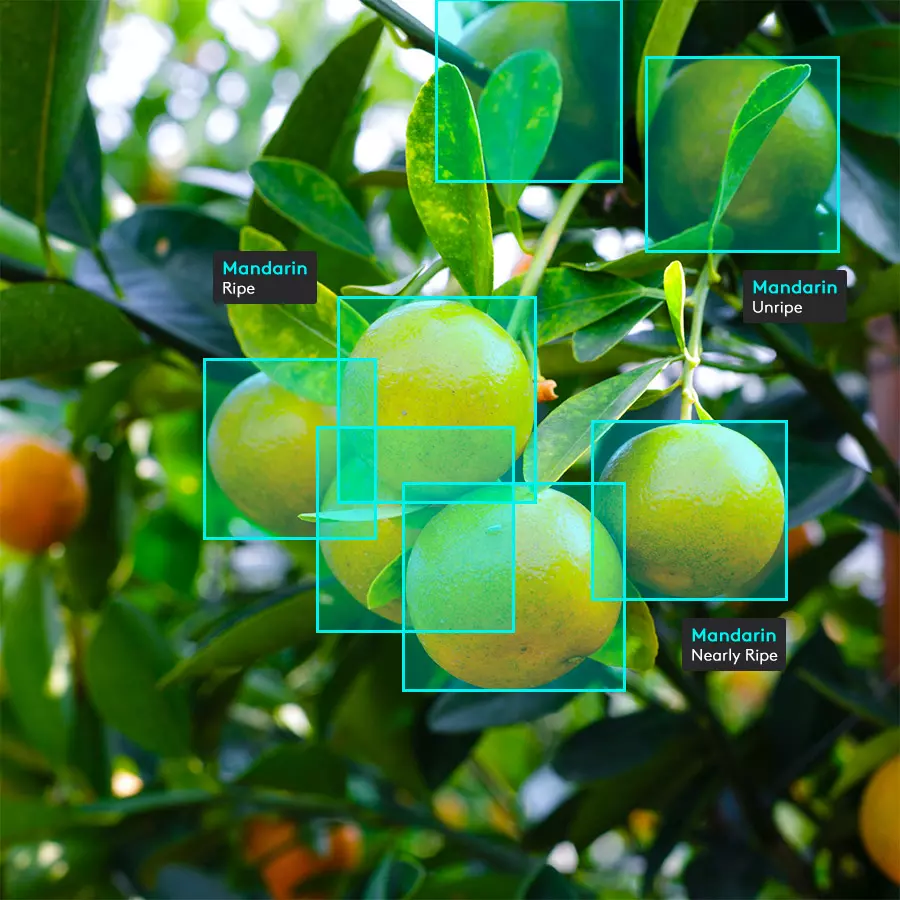
Bounding boxes are one of the most widely used annotation methods in computer vision because they help AI models learn to recognize and locate objects in images and video.
They are simple, fast to create, and flexible enough to support a wide range of object detection use cases across industries. For teams building or evaluating computer vision datasets, understanding how bounding box annotation works is essential for improving model accuracy and choosing the right annotation strategy.
Bounding boxes represent the basic way an image is labeled for location.
To be more specific, a bounding box is a rectangular annotation drawn around an object in an image or video frame. It marks an object’s position and the area it occupies within the frame. In most annotation tools, the box is defined by coordinates. Annotators typically record either the top-left and bottom-right coordinates, or the center point with width and height values, to define the box’s position and size.
Bounding boxes are typically either 2D or 3D.
A 2D bounding box is used for standard images or video frames. It indicates the object’s spatial location on a flat plane. These are used widely for retail shelf detection, medical imaging, security camera analysis, and general object recognition.
A 3D bounding box adds depth information by outlining an object's position, orientation, and estimated dimensions. This is especially important in applications like autonomous vehicles, robotics, and advanced mapping, where understanding distance and depth is critical.
This foundation supports everything that follows in object detection, model development, and annotation strategy.

Bounding boxes provide training signals for computer vision models, which learn from bounding box object detection annotations. During training, models may receive thousands or millions of images with boxes already drawn around target objects. This helps the model learn two tasks:
Once trained, the model predicts bounding boxes for new images, helping automate tasks. For example:
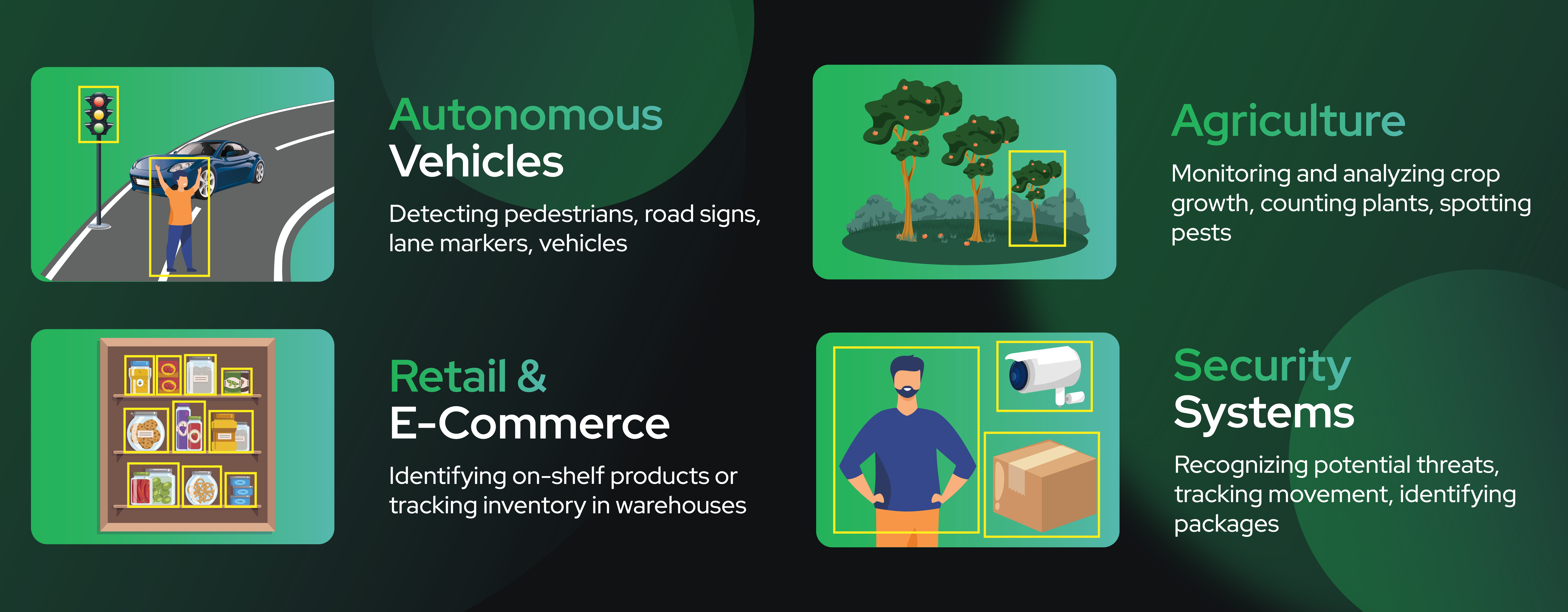
Autonomous vehicles use bounding boxes to help train models to detect pedestrians, road signs, nearby vehicles, and other objects within the driving environment.

Use cases for retail and eCommerce include Identifying on-shelf products, tracking inventory in warehouses, and in-store tracking.

Agriculture use cases include monitoring and analyzing crop growth, counting plants, and spotting pests.
Recognizing potential threats, tracking movement, or identifying packages.
Teams often rely on services like bounding box annotation support or expert image annotation support to ensure accuracy when scaling datasets. Faster annotation pipelines and better quality directly increase model performance.
High-quality bounding box annotations are key to accurate object detection. Achieving quality requires strict standards for drawing the boxes and handling complex, real-world scenarios.
Quality annotation means bounding boxes are tightly drawn around objects without cutting off any visible edges. They must capture the entire object and avoid capturing as much unnecessary background as possible. It cannot cut off any visible parts of the object without skewing the results.
Consistency is important here. Annotation must use the same class names, edge conventions, and labeling rules so that the model learns properly. This applies universally across:
Teams managing computer vision models or datasets often rely on a single annotation provider to maintain consistency across projects.

While drawing a bounding box may seem straightforward, significant challenges arise in real-world data applications. The most common are occlusion and truncation:
In each case, annotators would still draw a bounding box around the visible portion of the object. This helps the model understand how objects behave in the real world rather than in perfectly crafted scenarios.
Correct annotation of these edge cases is a strong indicator of whether an annotation team is producing training data you can trust. Companies evaluating vendors should ask how overlapping objects, partial visibility, motion blur, or poor lighting are handled. This knowledge is key when assessing annotation quality from service providers.
For video data, many teams also require video annotation support to manage frame-by-frame consistency.
Bounding boxes are fast and simple, but they are not always the best tool. Before choosing an annotation strategy, you need to know where bounding boxes fall short.
This limitation is part of the bounding box meaning in practice: because boxes are rectangular, they often include background pixels that aren’t part of the object itself. This can introduce noise, especially for irregular shapes or diagonal objects, and, in turn, hurt precision. Bounding boxes also provide location, but not precise shape information.
If a model needs to understand the exact outline of an object, segmentation offers a more precise alternative. Instead of labeling a broad rectangular area, segmentation outlines an object at the polygon or pixel level. This dramatically improves accuracy for tasks such as medical imaging, manufacturing inspection, and detecting tightly clustered objects.
Here’s a quick look at when it makes sense to use bounding boxes vs. segmentation in practice.
Teams choosing between these options need to consider accuracy, cost, and project size. Bounding boxes are generally sufficient for localization, but segmentation is worth the additional annotation time and cost when exact object boundaries are required. When projects require both precision and scale, many organizations pair bounding boxes with data annotation support for full workflow management.
Bounding boxes are a foundational tool in computer vision.
They help models learn to locate and identify objects, and they remain among the most widely used annotation types across industries, from autonomous vehicles to retail and agriculture.
The accuracy of these annotations directly affects model performance. Teams that invest in high-quality bounding box annotation improve detection accuracy, reduce training cycles, and accelerate deployment.
To streamline your annotation process or scale object detection projects, explore Sama’s bounding box annotation, expert image annotation, and full-service annotation solutions for customized support. Connect with a Data Annotation Expert at Sama to schedule a call.

Sama provides ML Professionals and AI team Leads with an indispensable solution for Computer Vision data labeling.

