Image annotation determines how effectively computer vision models interpret real-world scenes, making technique selection a core driver of accuracy, training efficiency, and long-term cost. This guide outlines the major annotation methods, when to use each, and the trade-offs between precision, speed, and budget. Readers will gain a clear framework for choosing the right techniques and tools for production-grade computer vision systems.


The difference between a computer vision model that performs well in production and one that struggles often comes down to the quality of the training data and its accuracy in representing real-world conditions.
Choosing the right image annotation technique plays a critical role in how accurately a model identifies objects, how efficiently it trains, and how overall project costs scale. For example, bounding boxes can be fast and cost-effective for basic object detection, but they lack the pixel-level precision required for applications like medical imaging.
This guide outlines the most common image annotation techniques and explains when to use each. Whether you're building autonomous vehicle perception systems, retail product recognition, or medical diagnostics, understanding these trade-offs helps you balance accuracy, speed, and budget.
Image annotation is the process of labeling visual data to train computer vision models. Annotators mark specific objects, regions, or features in images using techniques such as bounding boxes, polygons, or segmentation masks, creating ground-truth datasets that teach algorithms what to classify.
Annotated data is used across industries, such as:
Each application, however, requires different precision levels, which is why selecting the appropriate technique matters from the start.
Which annotation technique you need depends on object shape complexity, how precise it needs to be, your task type, and the size of your dataset. You may also want to consider what trade-offs are acceptable among speed, accuracy, and budget. For example, bounding box annotation is generally much faster to produce than polygons or segmentation, particularly when labeling large datasets.
Here are some general guidelines:
To understand how to choose image annotation techniques for your specific use case, let’s take a closer look at the different types of image annotation techniques.
Different computer vision tasks require different annotation approaches.

Bounding box annotation draws rectangular frames around objects, defined by coordinates or corner points. They are typically among the simplest and fastest annotation method for object detection tasks where approximate object location matters more than precise shape.
Common applications include retail/eCommerce annotation, autonomous driving annotation, security surveillance, and warehouse robotics.
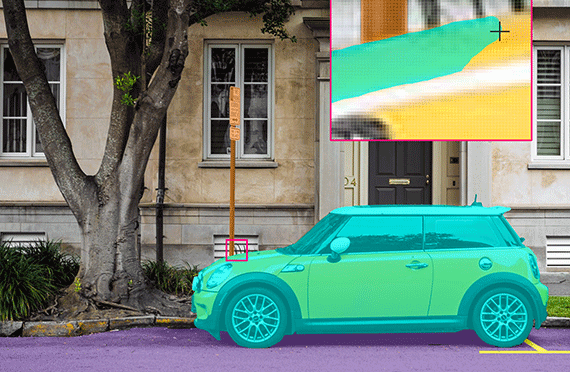
Polygon annotation tools draw multi-sided shapes by connecting vertices around an object's perimeter, offering greater precision for oddly shaped items.
For example, retail/eCommerce annotation uses polygons to capture clothing and accessories with non-rectangular shapes in AR applications that require very precise boundaries to simulate how outfits look when tried on. The same approach can be used to annotate complex furniture outlines for visualization or spatial planning applications. In robotics, polygons are also used to label irregular part geometries.
Segmentation techniques classify images at the pixel level. Here is a short breakdown of types, output, and use cases:
Semantic segmentation assigns each pixel to a class without distinguishing individual instances. Example: All cars get the same label. Autonomous vehicles use this to understand drivable areas and lane markings.
Instance segmentation identifies and separates each individual object, even when they overlap. This approach enables object counting and tracking. Medical imaging uses this to identify and measure individual cells or tumors.
Panoptic segmentation combines both approaches, providing semantic labels for background and instance labels for objects. The result is more comprehensive scene understanding, but it typically requires the highest annotation effort.
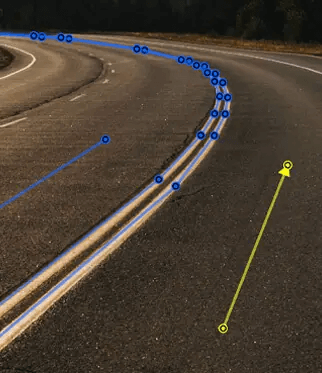
Polyline annotation creates connected line segments that follow paths or boundaries. Unlike closed polygons, polylines remain open-ended, making them ideal for roads, lanes, cracks, and other linear features.
Examples include:
While arrows or visual markup may appear in review workflows, they are typically used for clarification rather than as structured training annotations.

Keypoint annotation is used to label specific landmarks or reference points within an image. This type of annotation involves marking the key points or points of interest within an image, such as the corners of a building or the location of a particular object.
It can help robots identify and manipulate objects to perform complex assembly tasks with greater accuracy and efficiency.
It is also used in sports analytics to identify and track athletes' movements. In soccer, key points annotation can be used to track the position and movement of players and the ball during a game, providing valuable data for coaches and analysts.

3D cuboid annotation extends bounding boxes into three dimensions, defining an object's length, width, height, and orientation in space. Annotators mark eight corners representing the object's volume and pose.
Autonomous vehicles use 3D cuboids to calculate distances and predict trajectories. For example, in autonomous vehicle applications, they can identify and track other vehicles, pedestrians, and objects in the environment, enabling the vehicle to navigate safely and avoid collisions. A similar approach helps guide autonomous vehicles in warehouse operations.
However, 3D annotation requires camera calibration and understanding of projection geometry. Occlusion presents challenges when estimating hidden corners.
Attributes and tags add descriptive metadata to annotated objects. While bounding boxes show where a vehicle is, attributes specify whether it's a sedan or truck, moving or parked, damaged or intact, with lights on or off. This metadata improves dataset quality by teaching models to handle edge cases, recognize object states, and adjust confidence based on conditions like occlusion or image quality.
Attributes and tags are layered on top of other annotation types rather than used alone. They extend bounding boxes, polygons, segmentation masks, keypoints, or cuboids with contextual information that would otherwise be lost in purely spatial annotations.
Common attribute types include:
So, which is right for you? Here is how the different annotation types compare.
The image annotation tools you select affect project speed, quality consistency, and maintainability. The platform's ability to support your workflow from pilot through production determines whether annotation scales effectively.
Essential features to evaluate include:
Annotation quality determines model performance more than most other factors. In many cases, models trained on smaller, high-quality datasets outperform those trained on much larger but inconsistently labeled data. Maintaining quality at scale requires systematic processes, not just skilled annotators.
Sama's human-in-the-loop QA model combines multiple validation layers, such as:
Sama's annotation services consistently achieve 95-99% accuracy across diverse projects by combining trained teams, purpose-built tools, systematic workflows, and continuous improvement processes. Without these controls, annotation errors compound during training and surface as costly production failures.
Selecting the right data annotation provider and quality processes determines whether your computer vision model succeeds in production.
Sama's image annotation services deliver accuracy across diverse industries through systematic quality assurance, ISO-certified operations, and continuous improvement processes.
Ready to build high-quality training datasets? Get a consultation to validate your annotation approach, estimate cost and accuracy trade-offs, or launch a pilot project with Sama's expert annotation team.

Sama provides ML Professionals and AI team Leads with an indispensable solution for Computer Vision data labeling.

